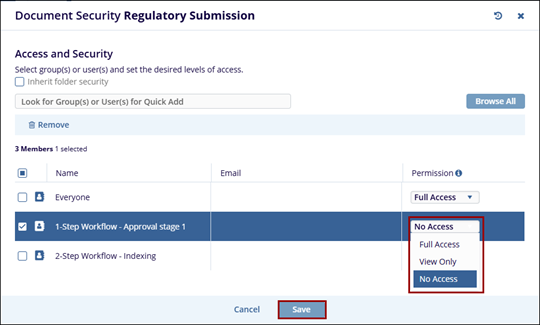
View Document Security
Administrator-level users can apply specific document-level security via the Document Activities menu. Selecting View Document Security will open the Document Security window.
Follow the steps below to view the document security:
- Select a document and click on the View Document Security button from the document activities menu.
- The Documents Security window will display the users or groups with the access
permissions by default if the Inherit folder security is enabled.
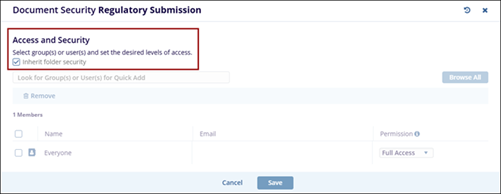
- To add additional users or groups, disable the Inherit folder security setting and
click on the Browse All button.
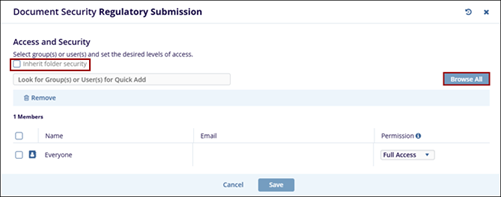
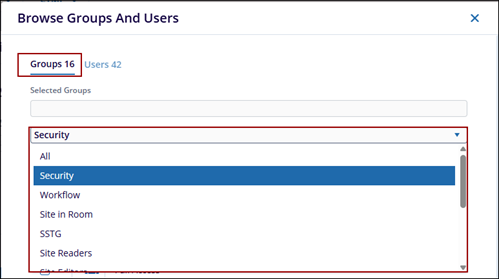
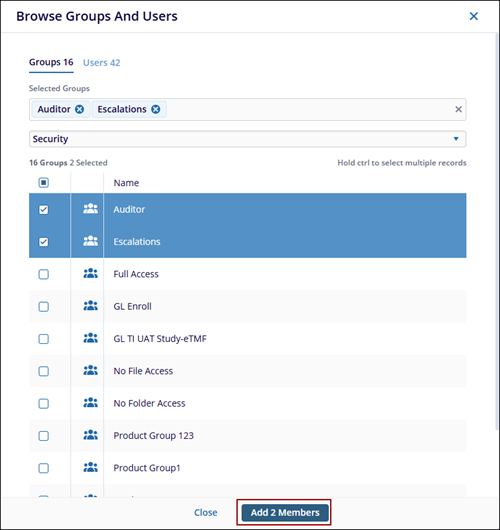
- In the Browse Groups and Users window, switch between the Groups and Users tabs and select the desired groups or users.
- On the Groups tab, use the dropdown menu to filter groups by category.
- After selecting the required groups or users, click the Add (number of members)
Members button.
- After adding the groups or users, click the Permissions dropdown to assign
the appropriate access level:
- Full Access
- View Only
- No Access
- Click on the Save button.