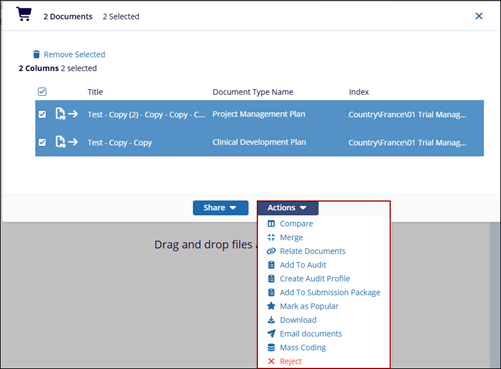
Actions menu
The Actions menu provides a set of bulk operations that can be performed on the selected
documents, enabling users to manage, review, and process documents efficiently within
the system.
- Compare – Allows comparison of selected document versions to identify differences.
- Merge – Combines multiple selected documents into a single document.
- Relate Documents – Links selected documents to establish relationships between them.
- Add To Audit – Includes documents in an audit for review or compliance purposes.
- Create Audit Profile – Creates a new audit profile using the selected documents.
- Add To Submission Package – Adds documents to a submission package for regulatory or distribution purposes.
- Mark as Popular – Flags documents for quick access or frequent use.
- Download – Downloads the selected documents to the local system.
- Email Documents – Sends the selected documents via email.
- Mass Coding – Applies metadata or classifications to multiple documents at once.
- Reject – Rejects the selected documents as part of a workflow or review process.