
List Users
Explore Videos for more help:
Videos
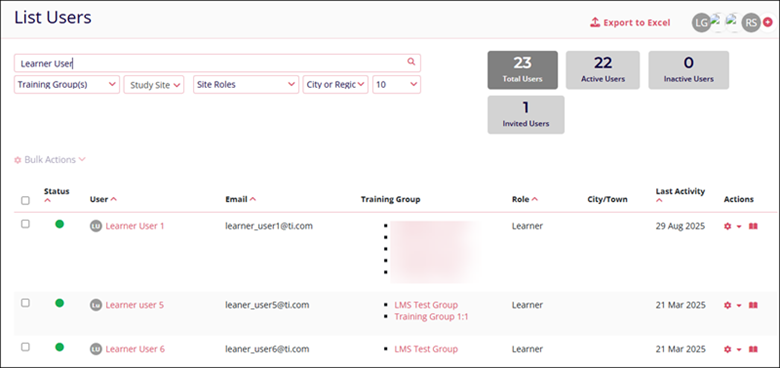
The List Users screen displays a list of all Active, Inactive, and invited users in GlobalLearn. Admins can edit one or multiple users at a time, i.e., edit user profiles, manage training groups mapping, and manage mapping managers to learners.
The List Users panel displays the following columns
- Status: Indicates whether the user is Active, Inactive, or Invited.
- User: Displays the user’s name
- Email: Displays the email ID used to share the password registration link
- Training Group: The list of training groups the user is associated with.
- Role: Displays the roles assigned to the user
- City/Town: Displays the name of the place the user is situated in
- Last Activity: The last date when the user signed into GlobalLearn
- Actions: Displays various user-related actions such as
- Suspend
- Edit
- Reset Password
- Manage Mapping
- Active Catalog

TransPerfect’s Trial Interactive is an industry leader in practical, global eClinical innovation
PRODUCTS
 Linkedin
 X
X
Didn’t find what you need?
Our dedicated Project Management and Client Services team will be available to meet your needs
24 hours a day, 7 days a week.
Toll Free:
(888) 391-5111
help@trialinteractive.com
© 2025 Trial Interactive. All Rights Reserved

