
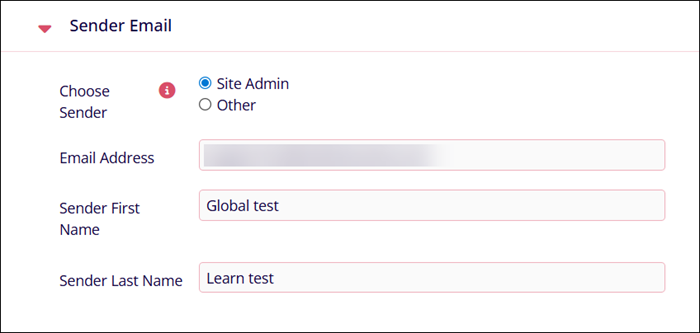
Sender Email
The Sender Email setting specifies the email address that the system uses when sending notifications or messages to users. All outgoing emails will display the configured address as the sender.
| Setting Name | Description |
| Choose Sender |
Click on the Site Admin or Other radio box. Note:
Site Admin email address is pre-configured and cannot be edited. |
| Email address |
If the Other radio box is selected, enter the user's email address. Note:
If Site Admin is selected, the email address field becomes non-editable. |
| Sender's First Name | Enter the sender's first name. |
| Sender's Last Name | Enter the sender's last name. |
© 2025 Trial Interactive. All Rights Reserved

