
Restrict Duplicate Responses
When an email is sent to recipients, the newly added Restrict Duplicate Responses feature checks whether a recipient is already included in the mailing list. If so, it prevents the addition of duplicate entries.
Steps to Enable the Restrict Duplicate Responses, follow these steps:
- Navigate to the Forms Overview screen.
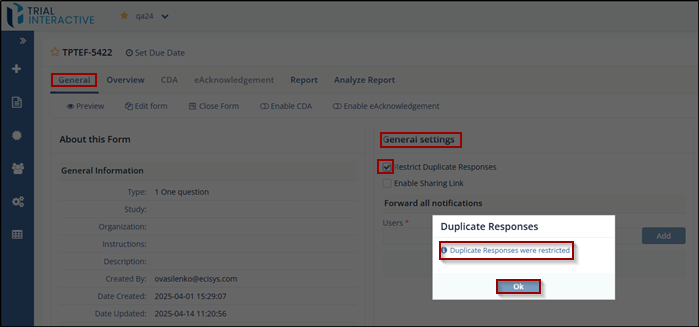
- Click on the General tab and under the General settings.
- Check the box labeled Restrict Duplicate Responses .
- The Duplicate Responses window will pop up with a message stating ‘Duplicate Responses were restricted’.
- To confirm that the setting is now active, click on
Ok button.
© 2025 Trial Interactive. All Rights Reserved

