Events
Explore Job Aids and Videos for more help:
Job Aids
Videos
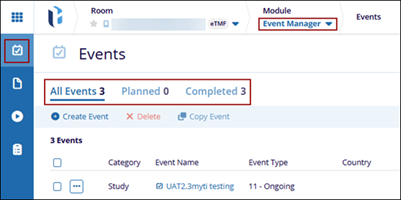
The Events section provides an organized view of all scheduled and completed events within the system. It includes filtering options for different event statuses such as All Events, Planned, and Completed.
Important:
- Ensure that the Event Manager action has been added to the user’s profile via the User Management module.
- Before creating a specific event in the system, ensure the event type has been created.
To access the events tab, follow the steps below:
- Click the waffle menu (navigation grid) at the top left.
- Select the Event Manager module.
- Click the Events tab from the left-hand navigation pane.
- The events are categorized and displayed in the following three tabs.
- All Events: This tab includes the event name of all statuses, any impacted sites or countries, event type, etc.
- Planned: This tab displays the planned events, with the event name, event type, planned date, etc.
- Completed: This tab displays the completed events, with the event name,
event type, completed date, etc.