
Deactivate Contact
To deactivate a contact, follow the steps below:
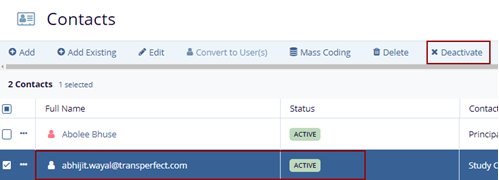
- Select the contact that is in the Active status, the metadata panel is displayed on the right side of the screen.
- Click the Deactivate button on the top menu
bar.
Note: The user can click the Deactivate button available in the metadata panel.
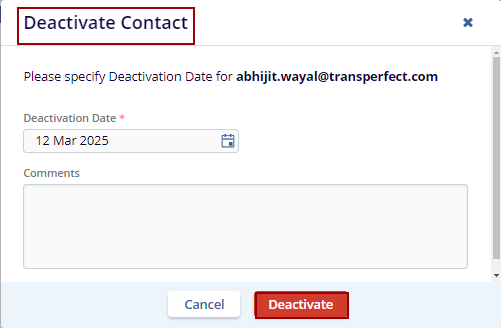
- The Deactivate Contact pop-up window is displayed with Cancel and Deactivate buttons.
- Fill in the required fields and click the
Deactivate button.
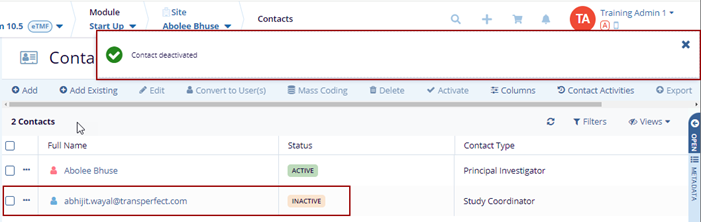
- The selected contact gets deactivated and the notification message is displayed on
the top right side of the screen and the status column displays the Inactive status.

TransPerfect’s Trial Interactive is an industry leader in practical, global eClinical innovation
PRODUCTS
 Linkedin
 X
X
Didn’t find what you need?
Our dedicated Project Management and Client Services team will be available to meet your needs
24 hours a day, 7 days a week.
Toll Free:
(888) 391-5111
help@trialinteractive.com
© 2025 Trial Interactive. All Rights Reserved

