
Users
This tab displays available users and key details to the SSU module.
This tab displays available users and is added to the SSU module. Additional actions include Inviting a User, Editing the Dashlet Name, Refreshing, Managing Columns, Creating & Managing Filters, and Saving Views.
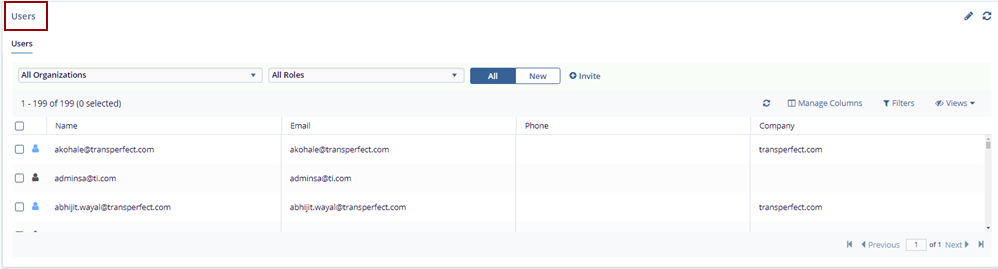
Steps to Use the Q&A tab:
- Navigate to the Users dashboard.
- Users can filter by Organizations and
Roles using dropdowns.
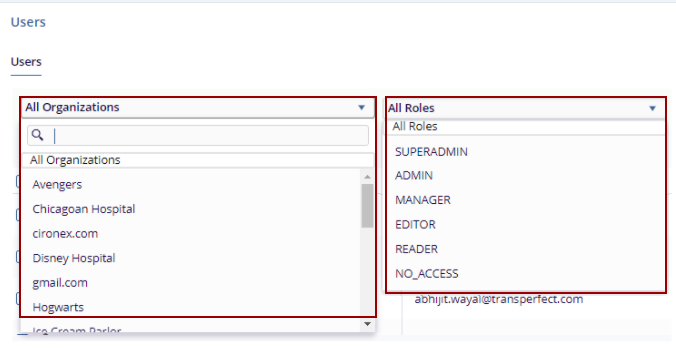
- Click the New tab to view only new users or the All tab to see all users.
- Click +Invite the User Invitation pop-up window is displayed. Follow the steps from Inviting Contacts and Managing Security.

TransPerfect’s Trial Interactive is an industry leader in practical, global eClinical innovation
PRODUCTS
 Linkedin
 X
X
Didn’t find what you need?
Our dedicated Project Management and Client Services team will be available to meet your needs
24 hours a day, 7 days a week.
Toll Free:
(888) 391-5111
help@trialinteractive.com
© 2025 Trial Interactive. All Rights Reserved

