
Score calculation (%)
In the form, each question has several answer options, and each option has its own rank (weight). The lower the rank number, the higher the score: rank 1 means the best answer, while the highest rank number means the weakest one. The system automatically converts these ranks into scores on a 1–10 scale, sums up the results for all questions, and calculates the percentage based on the maximum possible score. For example, if the form has three questions (a total of 30 points) and a user gets 18 points, the final result will be 60 %.
To add Score column from Available columns, follow these steps:
- Click Manage Columns. The Manage Columns window will open. At the bottom,
locate the Score (%) option, select it, and it will move to the Selected
Columns list.
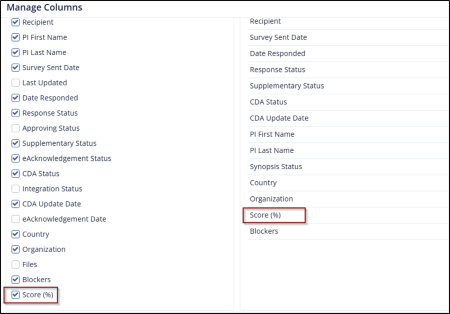
- Click Save to apply the changes.
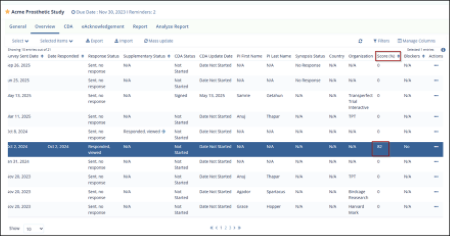
- The selected Score column will now appear in the Overview tab. Scroll to the
right to view the Score for each survey.
Example: User have a form that contains three questions.
Accordingly, the parentScore = 30 = 100% of the possible total.
Each question has several answer options:
- Question 1: option 1 = [7]; option 2 = [3]; option 3 = [2]; → maxQRank = [7]
- Question 2: option 1 = [2]; option 2 = [5]; option 3 = [9]; → maxQRank = [9]
- Question 3: option 1 = [1]; option 2 = [4]; option 3 = [8]; → maxQRank = [8]
The user selects the following answers:
- Question 1: option 2 rank: [3]
- Question 2: option 3 rank: [9]
- Question 3: option 1 rank: [1]
Calculation:
Question 1:
step = (10 - 1) / (maxQRank - 1) → (10 - 1) / (7 - 1) = 1.5
score = (maxQRank - rank) × step + 1 → (7 - 3) × 1.5 + 1 = 7
Question 2:
step = 9 / (9 - 1) = 1.12;
score = (9 - 9) × 1.12 + 1 = 1
Question 3:
step = 9 / (8 - 1) = 1.29;
score = (8 - 1) × 1.29 + 1 = 10.03
WHERE: Step is the scoring interval — it shows how many points decrease between each rank. It’s calculated as (10 − 1) / (topRank − 1) to evenly spread the 1–10 scale across all available ranks, where 10 is the maximum and 1 is the minimum possible score.
maxQRank (maximum question rank) is the highest rank value among all answer options in a question. It defines the upper limit of the ranking scale — for example, if a question’s answers have ranks 2, 4, and 7, then maxQRank = 7. This value is used in the scoring formula to calculate how each rank translates into points on a 1–10 scale.
Final result: rawScore = 7 + 1 + 10.03 = 18.03; parentScore = 3 × 10 = 30
finalScore = (18.03 / 30) × 100 = 60%. Final score: 60%
© 2025 Trial Interactive. All Rights Reserved

