
Electronic Signature Panel
To use Electronic Signature Panel, follow these steps:
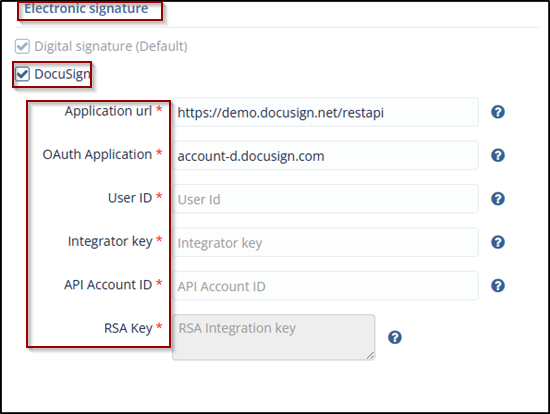
- Digital Signature (checked by default): This is default signature process that is used to sign the CDA.
- DocuSign: Selecting this checkbox displays the DocuSign eSignature panel to allow
you to enter the following configuration details to activate the feature:
- Application URL: Application URL for the DocuSign account.
- Username: Username for the DocuSign account.
- Password: Password for the DocuSign account.
- Integrator Key: DocuSign Integrator Key of the account.
- The Cancel and Save buttons (visible only when the DocuSign fields are entered). Refer to the screenshot below.
- Each of the above fields provides the help question mark at the
end clicking which displays the tooltip as below.
© 2025 Trial Interactive. All Rights Reserved

