
System Generated Questions
The System Generated Questions tab allows users to manage Question Groups, which are collections of predefined questions that can be reused across multiple surveys and forms. Each group can contain multiple questions, which can be viewed, edited, or expanded as needed. This streamlines the survey creation process by allowing consistent and centralized management of commonly used questions.
View and Edit System Generated Question
To View and Edit system generated questions, follow these steps:
- Navigate to the Settings menu and select the System Generated Questions tab.
- A list of existing Question Groups is displayed on the main page.
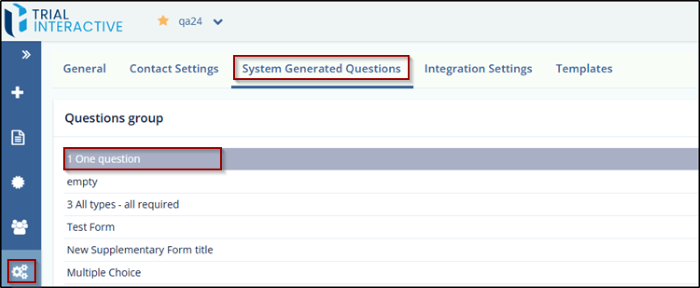
- Click on the name of any listed Question Group to view its details.
- To edit a question, click the Edit icon next to the question.
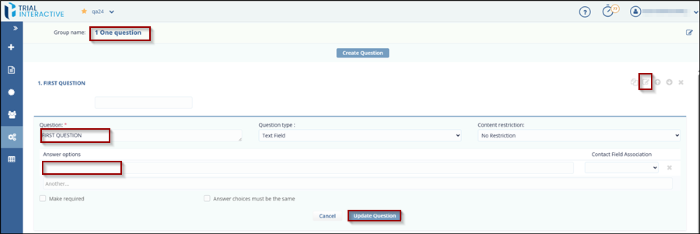
- An editing option will open, allowing you to modify the question and its answer.
- After saving, the edited question and answer will appear at the end of the list on the page.
Create New Question Group
To create a New Question Group, follow these steps:
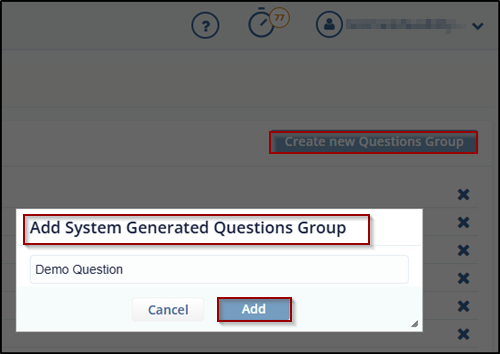
- On the main screen, click the Create New Questions Group button.
- A new screen will appear with a field to enter the group name.
- Enter the desired name for the new question group.
- Click Add to create and save the new group.
© 2025 Trial Interactive. All Rights Reserved

