
Mass Coding
Mass coding for metadata fields of Investigative sites is enabled after room administrators configure the relevant fields in the room’s Form Settings during the initial setup.
To mass code sites, follow the steps below.
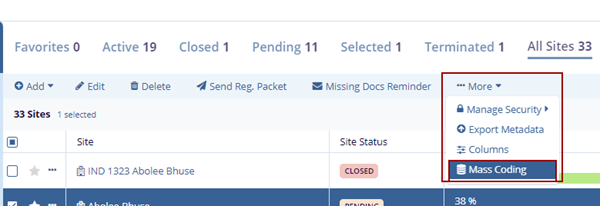
- Select a site by clicking on the checkbox and click the
More dropdown button and select Mass
Coding.
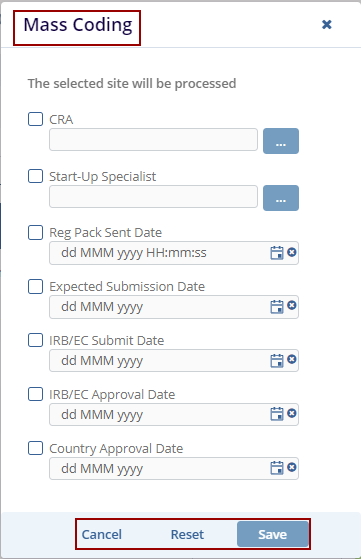
- The Mass Coding pop-up window is displayed with the Cancel,
Reset, and Save buttons.
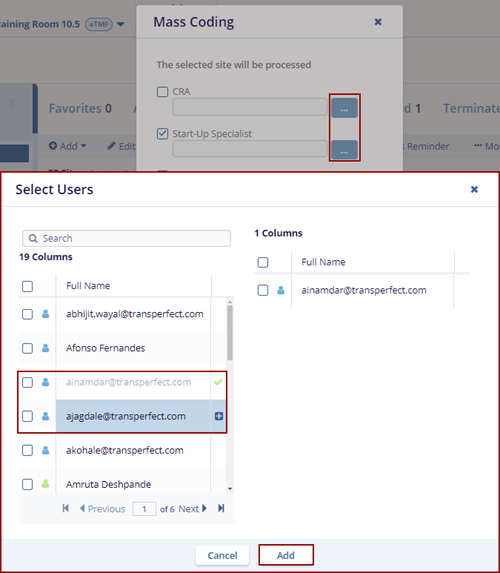
- Select the three-dot menu for the
CRA and Start-Up Specialist
fields. This opens the Select Users window.
- Hover the mouse to view the user in blue color and click the Plus icon next to the name.
- The selected names are reflected on the right side of the Select Users window.
- Click the Add button displayed at the bottom of the Select Users window.
- The selected users are reflected in the required fields.
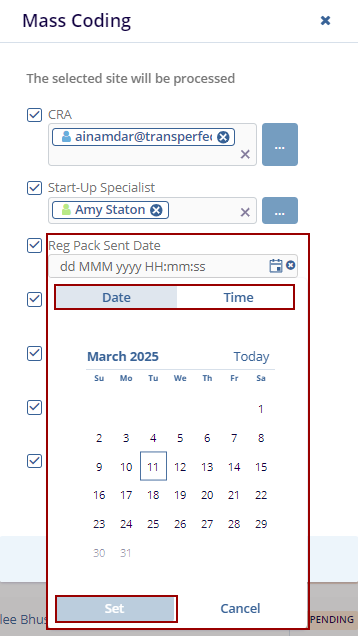
- If required, select the checkbox(s) for the below date fields
and click the Calendar icon next to those fields, select an
appropriate Date and Time, and
click on the Set button on the Calendar view.
- Reg Pack Sent Date
- Expected Submission Date
- IRB/EC Submit Date
- IRB/EC Approval Date
-
Country Approval Date
- Click the Save button displayed at the bottom of the popup window to save the changes.
- Click Reset button, if user wants to reset the previously added information and Cancel button to discard the changes.
- The Confirmation Mass Coding pop-up window is displayed with No and Yes buttons.
- Click Yes, in the Confirmation
window displayed on the screen.

- The coding changes will be added to the site profiles.
Note: If the requested coding additions or changes conflict with existing Investigative site profile data, the system displays a Warning message to the user. In such cases, the coding will not be completed, and the previously existing metadata will remain as a part of the site profile. To make such changes to the site profile, the user must use the Edit function mentioned earlier in this guide.

TransPerfect’s Trial Interactive is an industry leader in practical, global eClinical innovation
PRODUCTS
 Linkedin
 X
X
Didn’t find what you need?
Our dedicated Project Management and Client Services team will be available to meet your needs
24 hours a day, 7 days a week.
Toll Free:
(888) 391-5111
help@trialinteractive.com
© 2025 Trial Interactive. All Rights Reserved

