
Add to Cart
Users can add a document selected from the grid to the cart to compare documents, link them, add them to the submission package, or download documents.
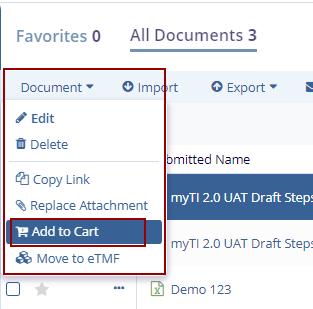
- Select the checkbox of the document that needs to be added to the cart.
- Click the dropdown menu of the Document button OR click the three-dot menu next to the checkbox of the selected document.
- Select the Add to Cart option. The Document Cart icon displays a number in
the top right corner.
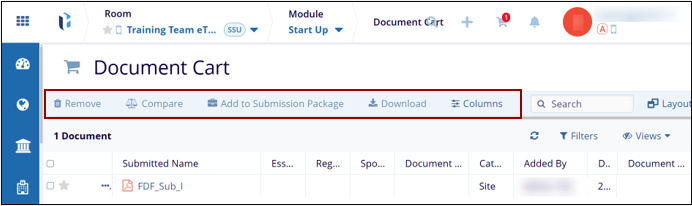
- Click the Document Cart icon to view the document details in the grid pane.
- The user can Remove, Compare, and Add Documents to the
Submission Package, Download, Manage Columns, Manage
and Create Filters, and Save Views in the grid pane.

TransPerfect’s Trial Interactive is an industry leader in practical, global eClinical innovation
PRODUCTS
 Linkedin
 X
X
Didn’t find what you need?
Our dedicated Project Management and Client Services team will be available to meet your needs
24 hours a day, 7 days a week.
Toll Free:
(888) 391-5111
help@trialinteractive.com
© 2025 Trial Interactive. All Rights Reserved

