
Modify Record Types
To modify the record types, follow the steps below:
- Navigate to the Settings module > Record Types Management and
select a record type category, i.e., Quality Event, CAPA, or Action Item, from the dropdown.
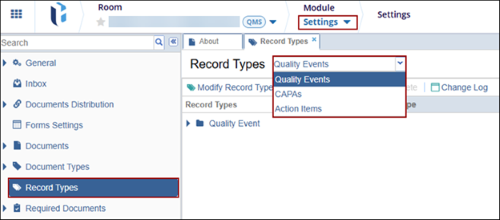
- Click on the Modify Record Types button from the top menu bar.

- On the Modify Document Types tree window, select a record type category and click on
the +Add button.
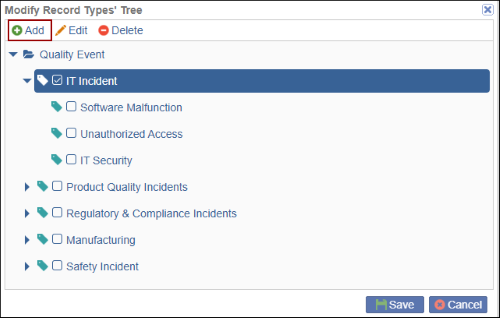
- Provide a name to the new record type and click on the Save button.
 Note:
Note:Once the new record type(s) are successfully saved, users can associate the record types with teams and workflows.
- To edit the record type, select the record and click on the Edit button on
the Modify Record Types tree window.
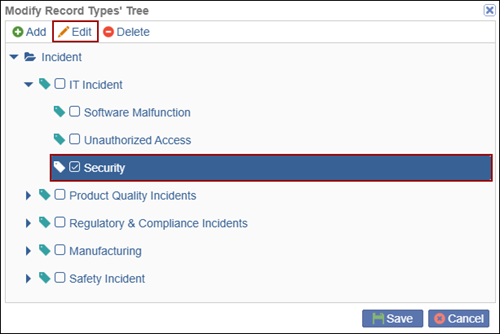
- Modify the record type name and click on the Save button.

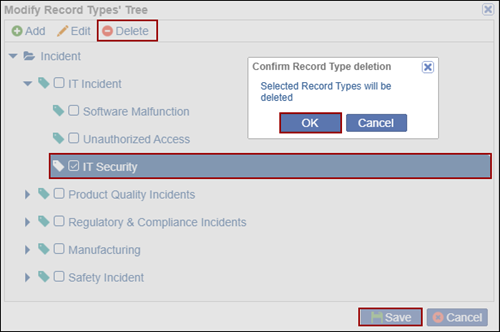
- To delete a record type, select the record and click on the Delete button on the Modify Record Types tree window.
- Click on the OK button on the confirmation pop-up to confirm the deletion and
click on the Save button to save the changes.
© 2025 Trial Interactive. All Rights Reserved

