
Promote a learner to an instructor
To assign an instructor role to a learner, follow the steps below:
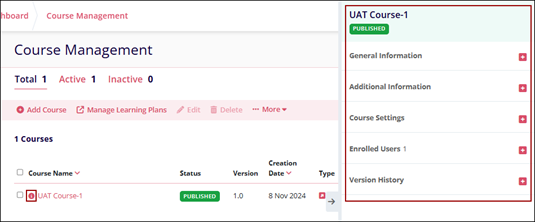
- Select a course from the Course Management page and click on the information (i) icon to
view the course metadata panel.
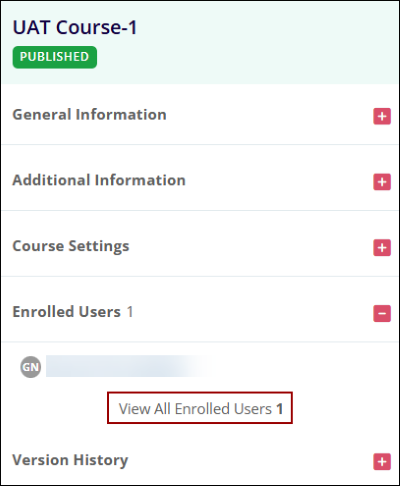
- Expand the Enrolled Users section and select the View All Enrolled Users option with the
courses metadata panel.
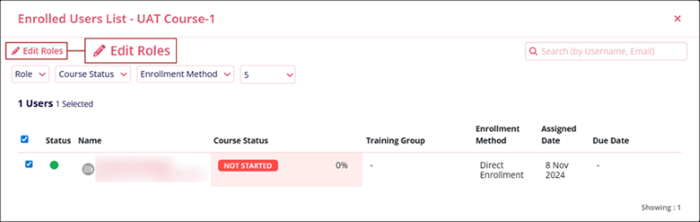
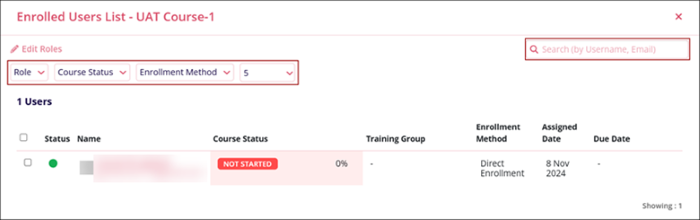
- On the Enrolled Users List screen, select the user and click on the Edit Roles
button.
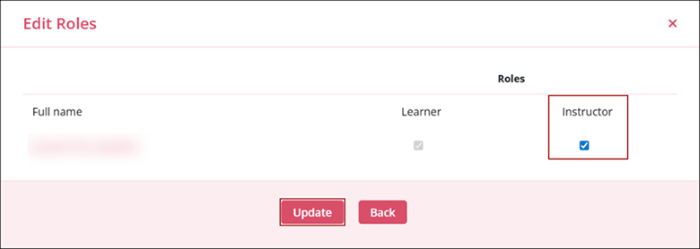
- On the Edit Roles screen, select the instructor role checkbox and click on the
Update button.
- Click on the Role, Course Status, or Enrollment Method filter dropdown to filter records.
- Enter a username or email in the search box to search for a specific user.
© 2025 Trial Interactive. All Rights Reserved

