
Regenerate Site Visit Report
When a report is rejected, report authors can either revise the visit information and regenerate the visit report or modify the document's content to revise it.
To regenerate a site visit report as author, follow the steps below:
- Navigate to the Site Visit General Information screen by following the steps detailed in the Site Visit Navigation section.
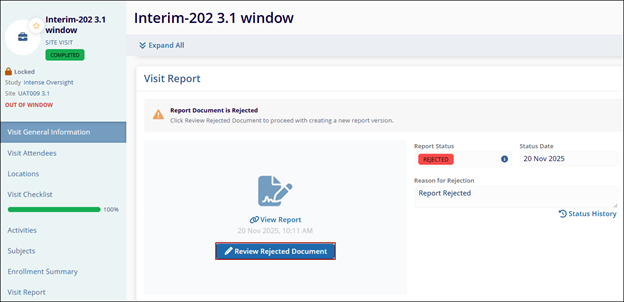
- Navigate to the Visit Report section, click the Review Rejected
Document.
-
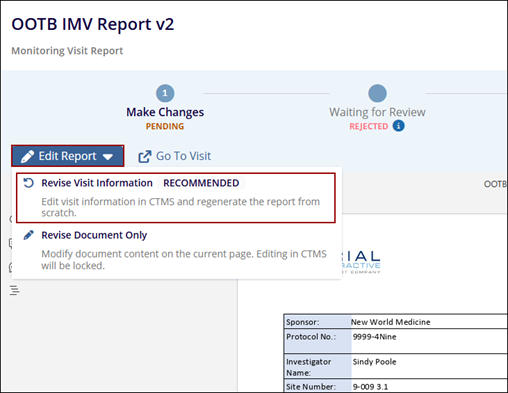
The report is opened in TI Viewer.
-
Click on the Edit Report and select the Revise Visit Information option.
-
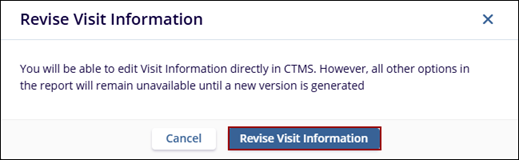
Click Revise Visit Information.
-
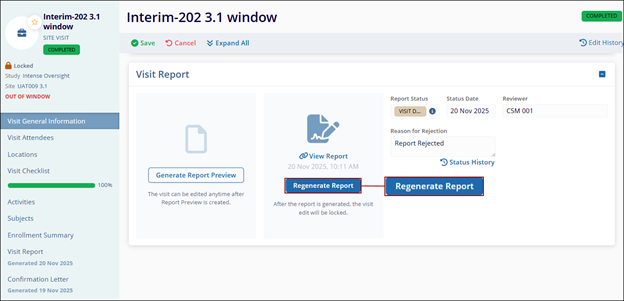
In CTMS, make changes to the visit information and click on the Regenerate Report.
-
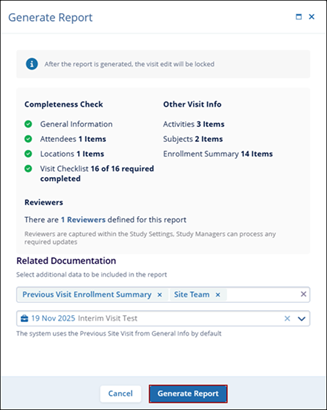
Verify the visit information and add additional information by selecting required options from the Related Documentation dropdown.
-
Click Generate Report.
-
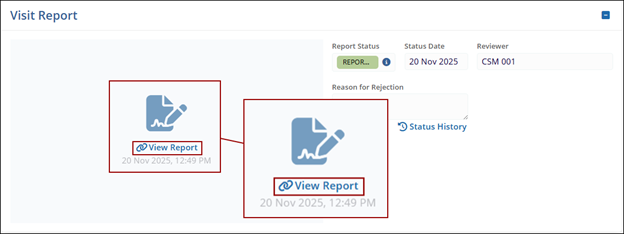
Click the View Report link.
-
Repeat Steps 6 to 12 to send the report to the approval workflow from the Site Visit Final Report Generation section.
© 2025 Trial Interactive. All Rights Reserved

