
Site Activation Status
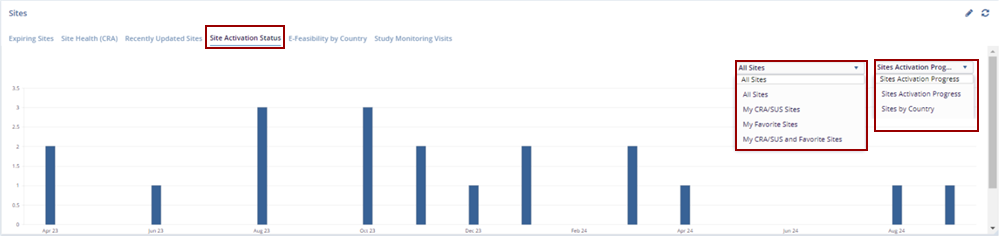
The Site Activation Status tab displays a bar chart showing the activation progress of sites over time. This tab allows users to filter by site groups and activation progress type, making it easier to track which sites are moving through the activation stages. The chart provides a representation of site activation on specific dates, helping users quickly assess activation trends and identify any sites that may require further action.
- Use the All-Sites dropdown menu to filter the chart by specific site groups, allowing the users to focus on a subset of sites relevant to the review.
- In the Site Activation Progress dropdown menu, choose the desired Site
Activation Progress type to adjust the chart based on specific activation criteria or milestones.

TransPerfect’s Trial Interactive is an industry leader in practical, global eClinical innovation
PRODUCTS
 Linkedin
 X
X
Didn’t find what you need?
Our dedicated Project Management and Client Services team will be available to meet your needs
24 hours a day, 7 days a week.
Toll Free:
(888) 391-5111
help@trialinteractive.com
© 2025 Trial Interactive. All Rights Reserved

