
Claimed & Unclaimed
In the eTMF dashboard, Claimed & Unclaimed sections refer to the status of documents, who is responsible for them, or who has taken action on them.
Follow the steps below to view Claimed & Unclaimed Documents:
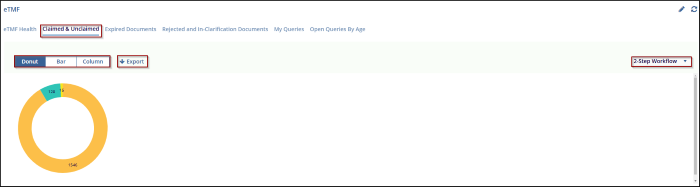
- Navigate to the eTMF dashboard and click on the Claimed & Unclaimed tab.
- The Claimed & Unclaimed tab is selected and the user can view the Claimed & Unclaimed Chart through the Donut, Bar, and Column view by selecting it.
- Use the dropdown on the right to filter the documents by their workflow stage, such as 2-Step Workflow.
- To export the displayed data, click Export, which allows the user to download
the information for further analysis.
© 2025 Trial Interactive. All Rights Reserved

