
Document Tracking in eTMF View
Reference:
Release Notes - MyTI
The enhancement introduces a comprehensive fulfillment tracking system within the eTMF view, categorizing documents into Fulfilled and Unfulfilled sections for better visibility and control.
-
TMF Health Completeness - Upload
The eTMF Health Dashboard now supports direct uploads for missing and overdue documents, improving timeliness and compliance. Overdue items appear at the top for quick action, with clear upload buttons for easy submission. This enhancement streamlines the document completion process and helps users maintain eTMF completeness efficiently.
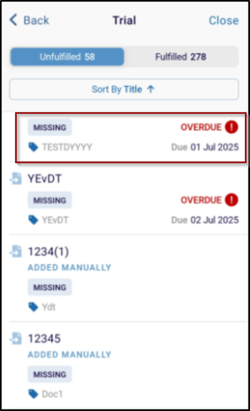
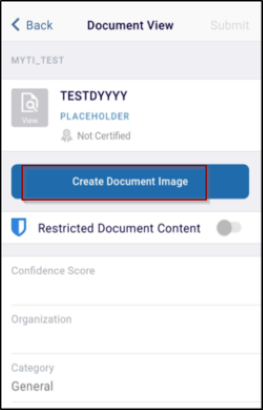
- Priority View for Overdue Documents in Unfulfilled Tab
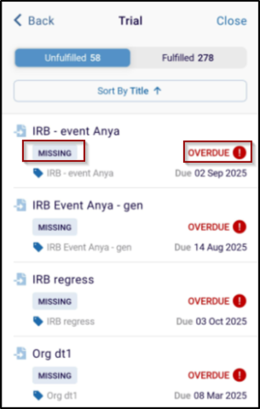
The Unfulfilled tab now prioritizes overdue documents, displaying them at the top for faster resolution. Red warning icons highlight overdue statuses, while other labels remain distinct for clarity. This update improves visibility and enables quicker follow-up on critical documents.
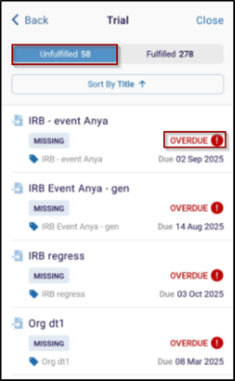
-
Overdue Document Counter in eTMF Health Dashboard Bar
A new counter has been added to the eTMF Health Dashboard progress bar, showing the total number of overdue documents. This provides instant visibility into pending actions, helping users monitor completeness and stay on top of document deadlines efficiently.
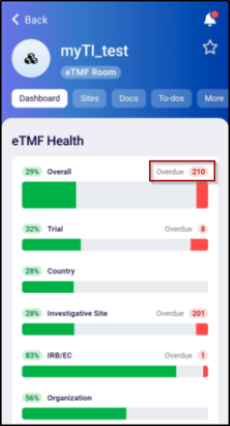
-
eTMF Health Dashboard - Document Status Labels
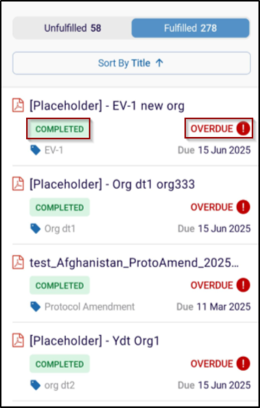
Standardized status labels - Missing, Submitted, and Overdue (with a red icon), now appear in the eTMF Health Dashboard for better clarity. Missing documents include a direct upload option, allowing immediate action and maintaining consistency across the dashboard.
- Missing - Unfulfilled Placeholder and includes an upload call-to-action. If Missing document is past its due date, an Overdue label appears alongside a red warning icon for immediate visibility.
- Submitted - Document that has been added to the room but QC review has not yet been completed (this status belongs to Unfulfilled section, might not appear depending on the Room settings).
- Completed - Document that has been successfully uploaded.
- Overdue - Displays with a red warning icon for immediate
visibility.
© 2025 Trial Interactive. All Rights Reserved

