
Contact Views
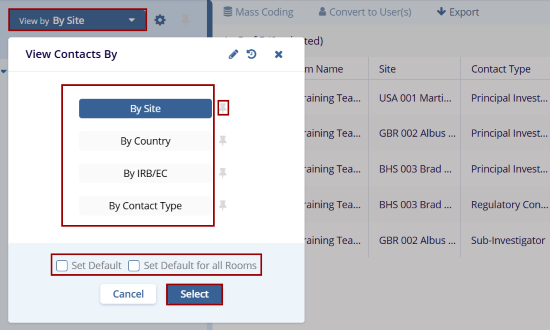
To access and configure the contact views, follow the steps below:
- On the Contacts screen, click on the View by dropdown.
-
On the View Contacts By window, select a view by clicking on the view name.
- By Site: Displays the contacts grouped by the site.
- By Country: Displays contacts grouped by their country association.
- By IRB/EC: Displays contacts grouped by the IRB/EC.
-
By Contact: Displays contacts grouped by the Contact Type.
- Click on the pin icon to pin a view and this view is selected once user access the Contacts modal.
- Check the Set Default checkbox to set the view as a default and Set Default for all Rooms to apply the view to all rooms.
-
Click on the Select button once the desired view is selected.
Customize Contacts views
Users can customize the contacts screen view by Managing columns and configuring views.
To manage columns and views on the Contacts screen, refer to the standard steps detailed in the Manage Columns section.
© 2025 Trial Interactive. All Rights Reserved

