
Schedule Activity Plans
To schedule Activity plans, follow the steps below:
- From the left-hand navigation links, click on Studies.
- Select a study by clicking on the study’s name.
.png)
- On that Study’s screen, navigate to the left-hand navigation links and select Activity Plans.
- On the Scheduled Activity Plan screen, select the Scheduled Plans tab >
+Add button.
.png)
- On the Schedule Activity Plans for Study screen, perform the following.
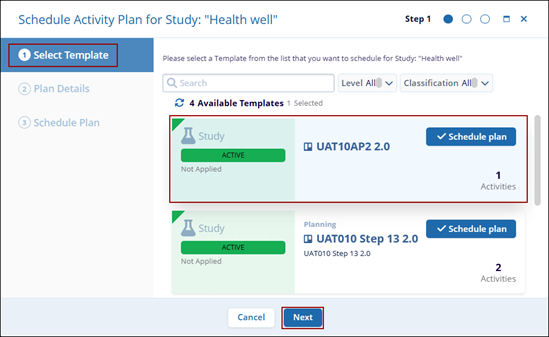
- Select Templates: Click on Schedule plan or the templates tile to select the
template and click on the Next button.
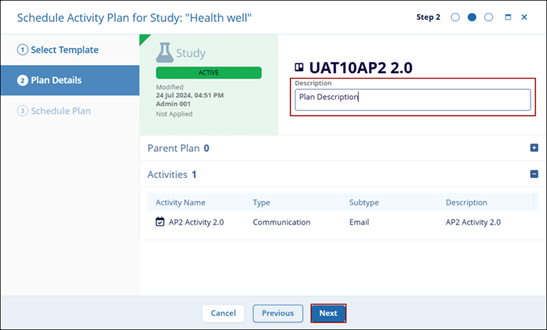
- Plan Details: On the Plan Details screen, add a suitable plan description and click
on the Next button.
- Schedule Plan: On the Schedule Plan screen enter the Stie, Country, and Study Status
from their dropdown options and select Schedule.
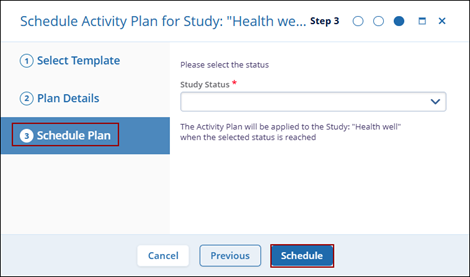
Note:- When a study-level template is selected, the Schedule Plan section displays only the Study Status dropdown.
- When a country-level template is selected, the Schedule Plan section displays the Study Status and Country Status dropdowns.
- When a site-level template is selected, the Schedule Plan section displays the Study Status, Country Status, and Site Status dropdowns.
- Select Templates: Click on Schedule plan or the templates tile to select the
template and click on the Next button.
© 2025 Trial Interactive. All Rights Reserved

