
Associate Activity Plan Templates to Study
To associate an Activity Plan Template to a Study, follow the steps below:
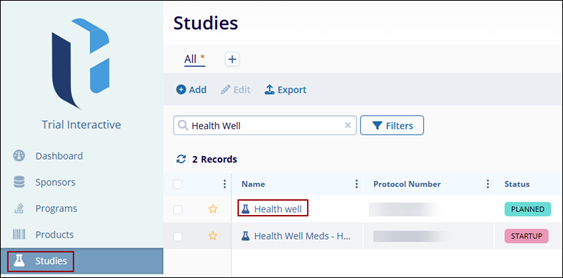
- From the left-hand navigation links, click on Studies.
- Select a study by clicking on the study’s name.
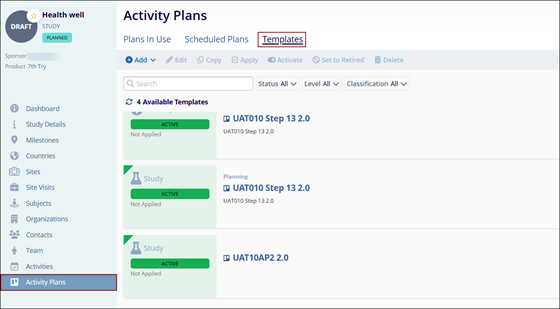
- On that Study’s screen, navigate to the left-hand navigation links and select Activity Plans.
- On the Activity Plans Template screen, click on the Templates tab.
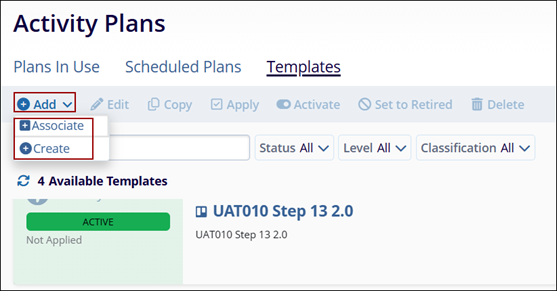
- Click on +Add > +Associate buttons.
 Note:
Note:To Create a new activity plan for the study click on +Add > +Create and follow the steps detailed in Create Domain Library Activity Template section.
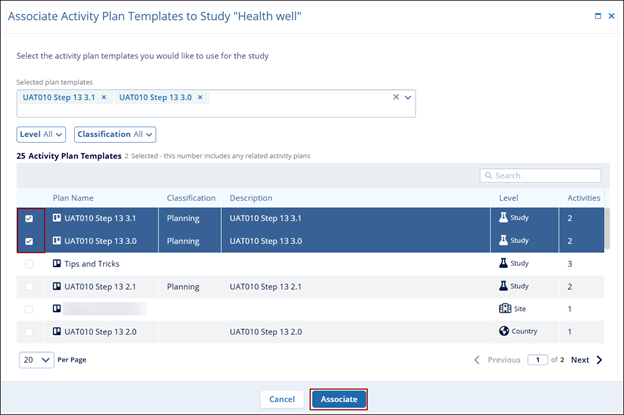
- On the Associate Activity Plan Template to Study, select activity plans by clicking on their respective checkbox.
- Click on Associate once the required activity plans are selected.
© 2025 Trial Interactive. All Rights Reserved

