
Edit Activity Plan Templates
Explore Job Aids for more help:
Job Aids
To edit an Activity Plan Template, follow the steps below:
Method 1
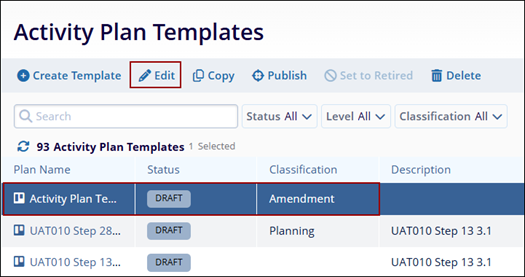
- Select a plan with DRAFT status by clicking on the plan tile.
- Click on the Edit icon from the top menu bar.
- On the Edit Activity Plan Template Window, access the General Information and Associated
Activities screen to make edits and save the changes.
Note:
Do not click on the plan name since it directly opens the Edit Activity Plan Template screen which is another method to edit an activity plan.
Method 2
- Select an activity plan by specifically clicking on the plan name.
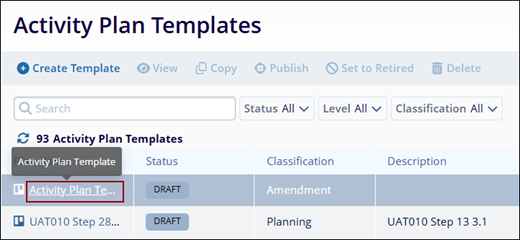
- Click on the Edit (Pencil) icon on the View Activity Plan Template.
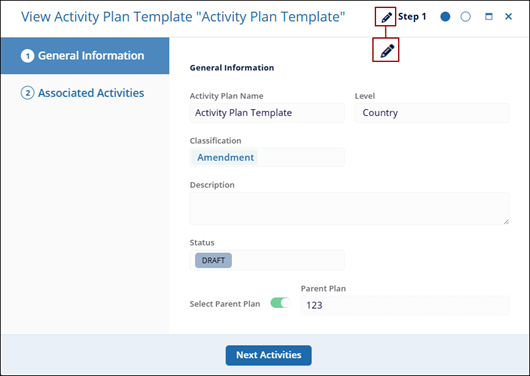
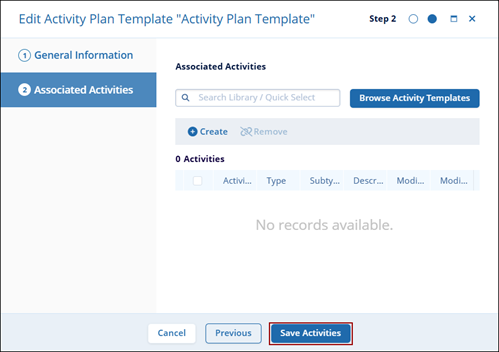
- On the Edit Activity Plan Template Window, access the General Information and Associated
Activities screen to make edits and save the changes.
© 2025 Trial Interactive. All Rights Reserved

