
Unfulfilled
Users will now see overdue documents automatically displayed at the top of the list within the Unfulfilled tab in eTMF Health. This pre-filtered view allows users to quickly identify and act on critical items requiring attention.
Standardized status labels - Missing, Submitted, and Overdue (with a red icon), now appear in the eTMF Health Dashboard for better clarity. Missing documents include a direct upload option, allowing immediate action and maintaining consistency across the dashboard.
- Missing – Includes an upload call-to-action.
- Submitted – Indicates the document has been successfully uploaded.
- Overdue – Displays with a red warning icon for immediate visibility.
Steps to Upload a Missing Document
- In the eTMF Health Dashboard, click on the below options (eg. Trial, Country.).
- User can see Unfulfilled and Fulfilled option, under unfulfilled option user can see
Missing and Overdue labels.
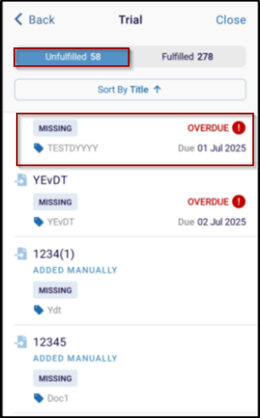
- Click one of the missing documents and the Create Document Image button
displayed.
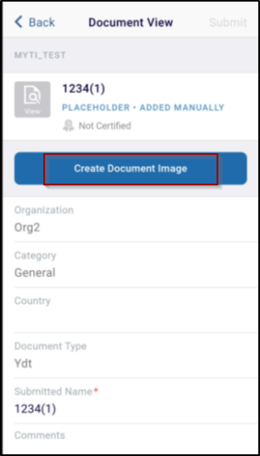
- Browse and select the correct file from your device.
- Confirm the upload to update the document’s status to Submitted.
© 2025 Trial Interactive. All Rights Reserved

