
Manage Groups
Create New Group
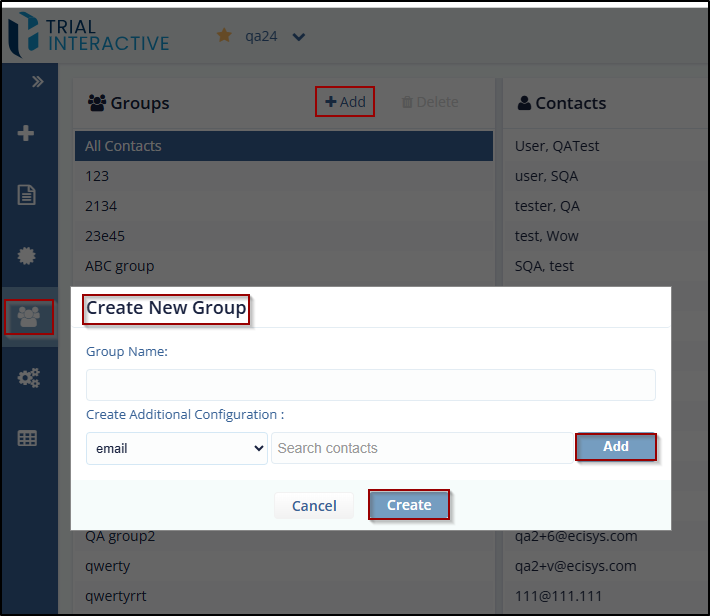
To create a new Group, follow these steps:
- Click the Add button from the Group Section
- The Create New Group pop up window is displayed.
- Enter the Group Name and then click the Create button to add the group to the list.
- To add contacts to the Group, type contact name in Search Contacts and click Add.
- Click Create and click the required Group view the added contacts to the
group.
Delete Group
Note:
- The user can delete only the newly created group.
- The All-Contacts Group cannot be deleted.
-
The Bin icon is visible only for the newly created groups.
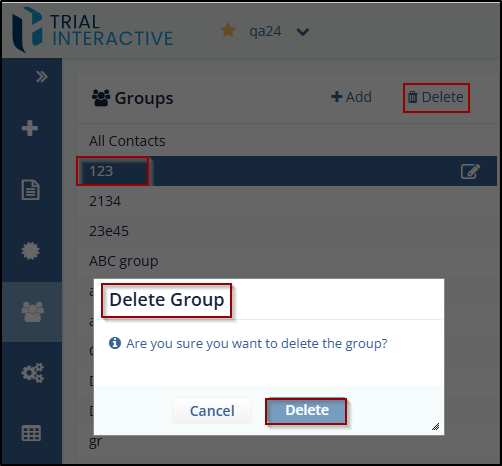
To delete the group, follow these steps:
- Select the Group which the user wants to delete.
- Click the Delete button in the bottom left corner from the Groups section.
The Delete Group dialog box opens asking for the confirmation of group deletion.
-
Click Delete button to delete the group or cancel to cancel the action.
© 2025 Trial Interactive. All Rights Reserved

