
Related Organizations
The Related Organizations screen displays all the child organizations associated with the parent organization.
Add Related Organization
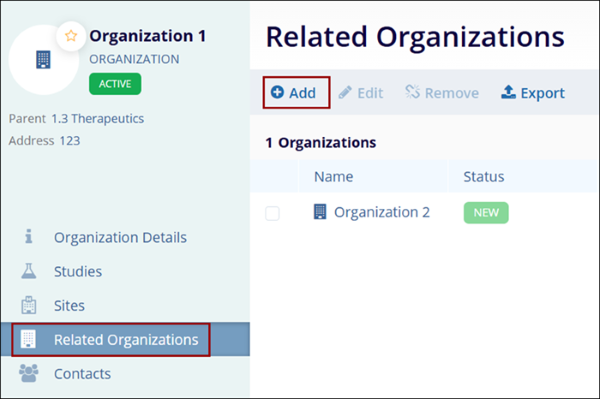
To add a child organization, follow the steps below:
- On the Organizations, tab click on the organization name.
- On the Organization Details screen, click on the Related Organizations from the left-hand navigation links.
- Click on the +Add button.
- Refer to the Create Organization section for the standard steps to create an organization.
Edit Related Organization
To edit a related organization, follow the steps below:
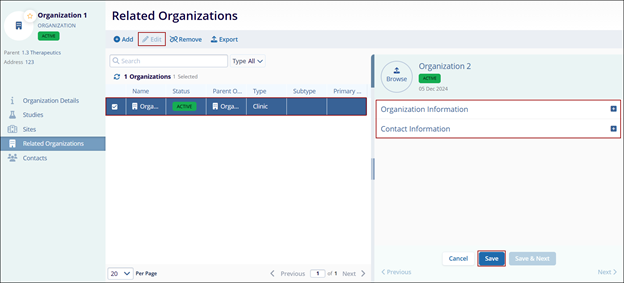
- On the Related Organizations screen, select an organization to edit.
- Click on the Edit button from the top menu bar.
- Make the necessary edits to the Organization and Contact Information sections in the Quick View panel.
- Click on the Save button.
Remove Related Organization
To remove a Related Organization, follow the steps below:
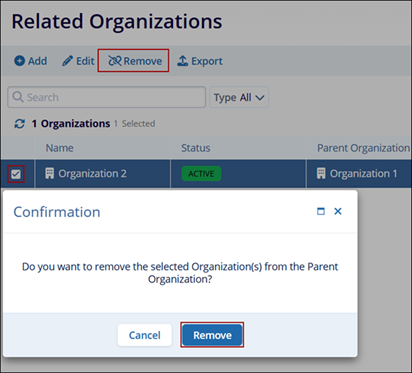
- On the Related Organizations screen, select an organization to remove.
- Click on the Remove button from the top menu bar.
- On the Confirmation popup, click on the Remove button.
Export Related Organizations
To export the Related Organizations, follow the steps below:
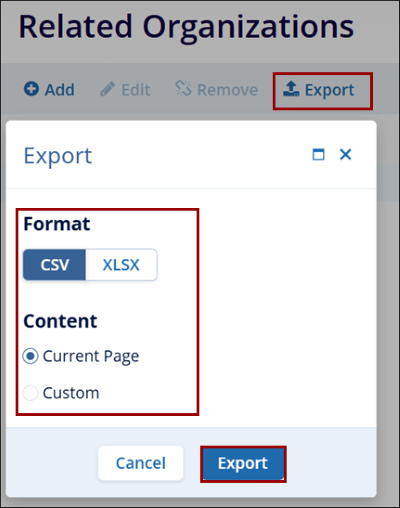
- On the Related Organizations screen, click on the Export button.
- Follow the standard steps to retrieve exports detailed in the Export Contacts section.
© 2025 Trial Interactive. All Rights Reserved

