
Study Start-Up Module
The Start-up module is accessible to users who meet all of the following criteria:
- The Study Start-up action should be enabled in their user profile.
- The users should belong to the Site Activation Members group in the data room.
Access Study Startup Module
Once the basic settings and contacts are configured for Study Start-Up, users can now move forward to operate the module.
To access the Study Start-up module, follow the steps below.
- Navigate back to the waffle menu and select the Start-Up module.
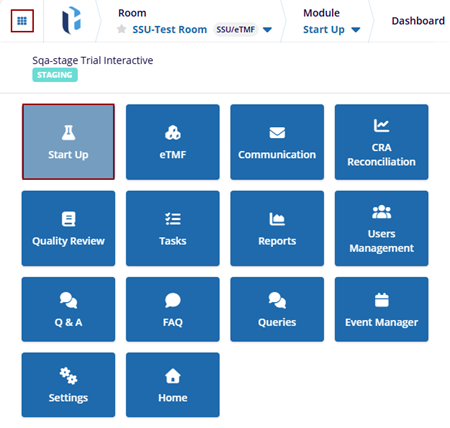
- The Start-Up module displays the relevant dashlets.
SSU User Interface
The SSU Module in Trial Interactive (TI) provides a streamlined platform for creating, monitoring, and activating clinical trial sites. Users can add, upload, track, and review the necessary documents for site activation through this interface.
The Start-Up module includes the following sections:
- Dashboard
- Country
- IRBs/ECs
- Sites
- Documents
- Amendments
- Contacts
- Communication Log
- Regulatory Review
- Translations
- Audit Trail
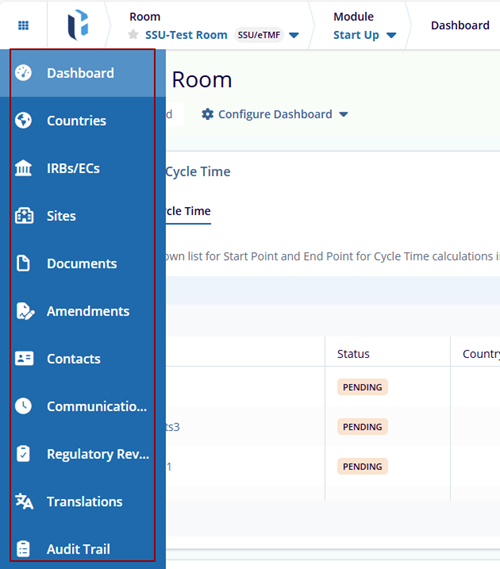
Note: The Toolbar options are available per the room settings and
user access.
© 2025 Trial Interactive. All Rights Reserved

