
Sponsor-Specific Milestones
Explore Videos for more help:
Videos
Associate Milestone Templates to Sponsor
To associate a Milestone Template with a Sponsor, follow the steps below:
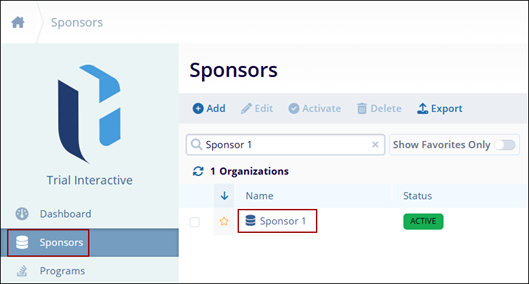
- From the left-hand navigation links, select Sponsors
- On the Sponsors screen, select a sponsor by clicking on the name.
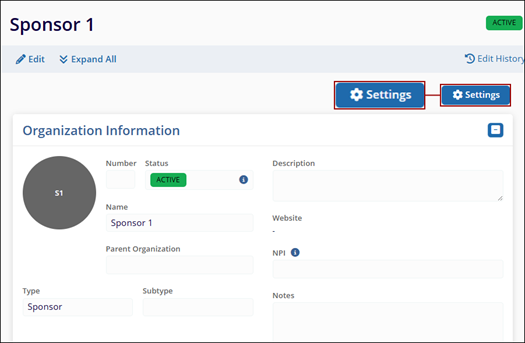
- On the Sponsor Details screen, click on the Settings button on the top-right
of the screen.
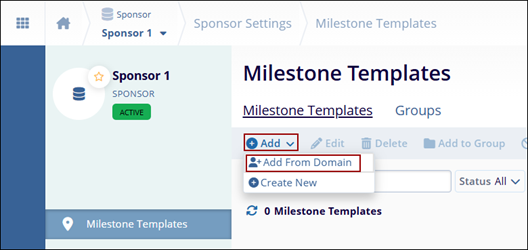
- On the Sponsors Milestone Templates, click on the +Add > +Add From Domain
buttons.
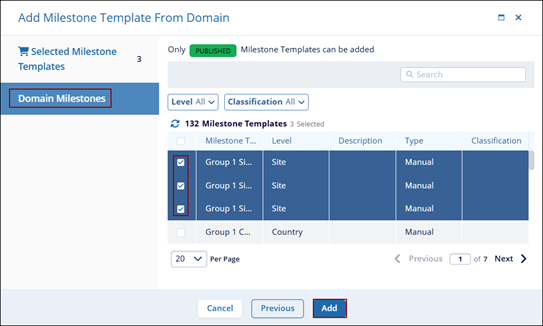
- On the Add Milestone Template from the Domain window, select one of the milestone templates by clicking on the milestone templates checkbox.
- Click on the Add button once all the required templates are selected.
Define Sponsor-Specific Milestone Templates
To define sponsor-specific Milestone Templates, follow the steps below.
To associate a Milestone Template with a Sponsor, follow the steps below:
- From the left-hand navigation links, select Sponsors
- On the Sponsors screen, select a sponsor by clicking on the name.
.png)
- On the Sponsor Details screen, click on the Settings button on the top-right
of the screen.
.png)
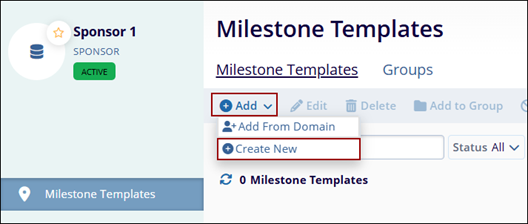
- On the Sponsors Milestone Templates, click on the +Add > +Create New
buttons.
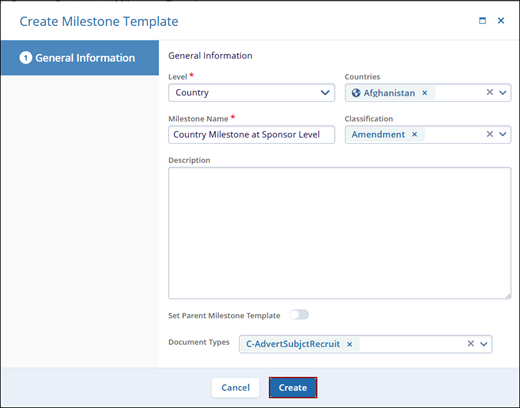
- On the Create Milestone Template from the Domain window, add all the mandatory details.
- Click on the Add button once all the mandatory details are entered.
© 2025 Trial Interactive. All Rights Reserved

